Expenses Introduction
The PEP Expense Hub is PerksPe's smart expense management system. It helps employees record, submit, and track business expenses — and get reimbursed faster.
What Can You Do?
| Feature | Description |
|---|---|
| Add Expenses | Record any business expense with details and receipts |
| Save Drafts | Save incomplete entries to finish later |
| Attach Receipts | Upload photos or documents as proof |
| Submit for Approval | Send expenses to your manager for review |
| Track Status | See where each expense is in the workflow |
| Add Comments | Communicate with approvers directly |
Expense Workflow
📝 Create → 💾 Draft (optional) → 📤 Submit → ⏳ Pending → ✅ Approved / ❌ Rejected → 📦 Reimbursement
| Status | Meaning |
|---|---|
| Draft | Saved but not submitted — only you can see it |
| Submitted | Sent to approver — waiting for review |
| Pending | Under review by manager/finance |
| Approved | Expense accepted — reimbursement processing |
| Rejected | Expense declined — check comments for reason |
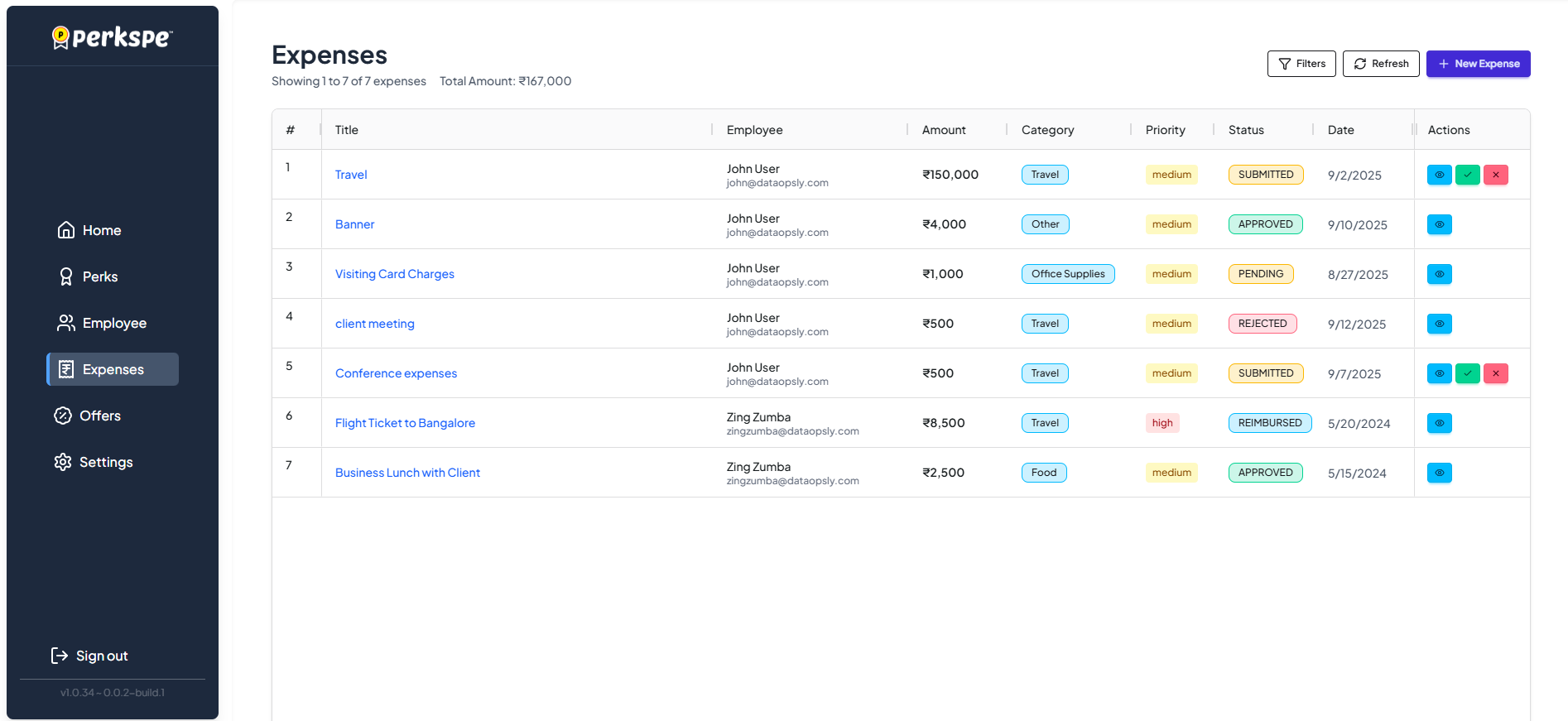
How to Access Expenses
From the left sidebar, click Expenses.
Why Use PEP Expense Hub?
| Benefit | How It Helps |
|---|---|
| Faster Reimbursements | Get paid within minutes of approval |
| No Paperwork | Digital receipts and automated workflows |
| Real-time Tracking | Know exactly where your expense stands |
| Clear Audit Trail | Complete history for finance teams |
| Policy Compliance | Built-in checks prevent policy violations |
Key Features
📱 Mobile Expense Capture
- Snap receipts with your phone
- Auto-extract data using OCR (Coming soon)
- Submit expenses from anywhere
🔄 Automated Workflows
- Smart approval routing
- Multi-level approval chains
- Policy violation alerts
📊 Real-time Analytics
- Track spending patterns
- Monitor budget utilization
- View expense trends
🔒 Compliance & Security
- Built-in compliance checks
- Fraud detection
- Secure data storage